
Checked, not just coded
More than 250 reference checks against Balanis, Pozar, Proakis and the ITU-R Recommendations run inside the app, and every calculator names the book or standard its equations come from.
All the details
Patterns, the link lab, microwave and RF, how the results are checked, all 47 calculators, installation and the plans side by side. For when you want the whole story.
Why mmWave Calculator
Formulas are everywhere. What’s rare is one tool you can trust for the whole job, from a quick dB sum to a link that has to survive the rain.
More than 250 reference checks against Balanis, Pozar, Proakis and the ITU-R Recommendations run inside the app, and every calculator names the book or standard its equations come from.
47 calculators, a Smith chart, matching, RF line-ups, modulation and a 3D link lab, with the same units and the same look. No hunting for the next website, no copying numbers between them.
Equations with every step, 3D patterns, link-budget waterfalls and impact plots that show which input moves the result most.
Put real antennas on a map, add terrain, polarization and ITU-R weather (gases, fog, clouds and rain), and see the margin, the coverage and the availability.
Everything runs on your Windows computer. Nothing you calculate is uploaded, and the app keeps working for 14 days without internet.
From CHF 19.99 a month for students, with a 14-day free trial and no contract. New versions arrive inside the app.
| Compared with what you’d use otherwise | Free web calculators | Your own spreadsheet | mmWave Calculator |
|---|---|---|---|
| Checked against textbooks and standards | Rarely said | If you build it | 250+ checks in the app |
| Shows the equations and the steps | Sometimes | If you build it | Every calculator |
| Patterns, Smith chart and link-budget plots | Sometimes | Hours of work | Built in |
| Links with terrain and ITU-R weather | Not included | Not included | Professional |
| Works offline, designs stay private | Not included | Included | Included |
Made for
Check homework and lab results against the textbook, step by step, and see what each input does.
Fast sanity checks and link budgets before, and after, the big simulation.
One tool and the same numbers for everyone, on one organization licence. Request a quote
Radiation patterns
Type a value and the pattern redraws as you type. The 3D view runs on your graphics card: drag to rotate, scroll to zoom, double-click to reset.
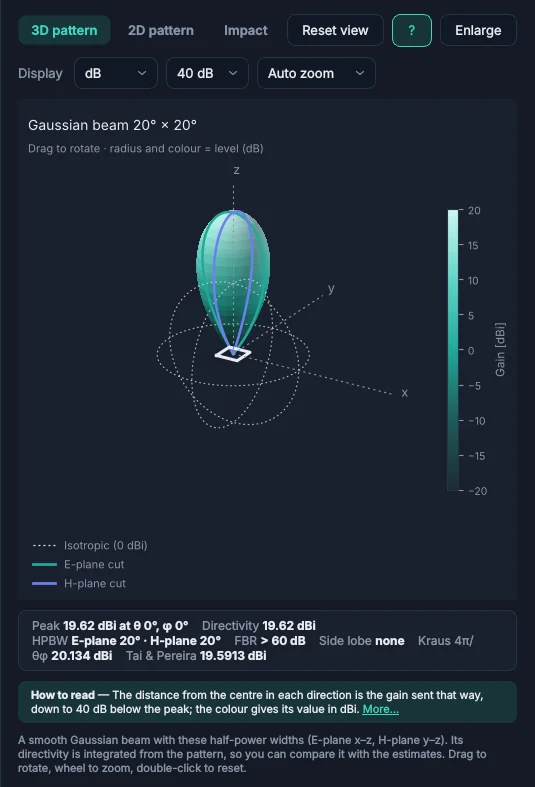
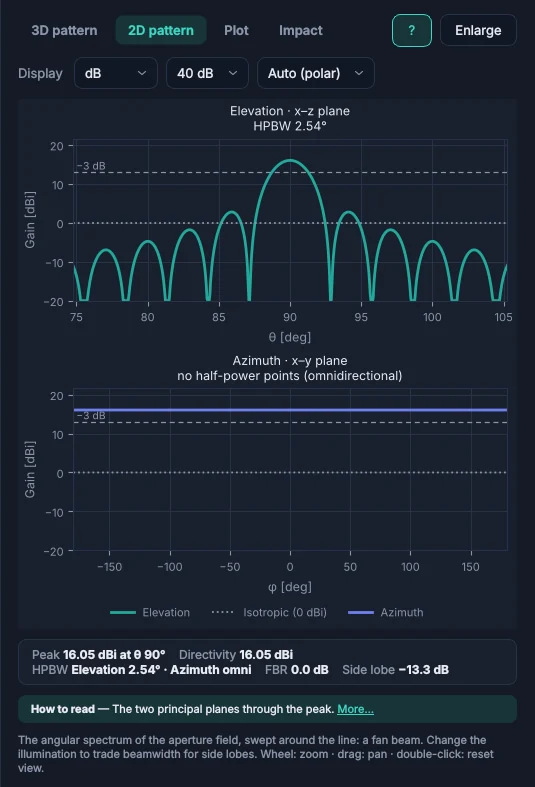
2D cuts in the E- and H-plane mark the half-power beamwidth, front-to-back ratio and side-lobe level, in dB with a 20 to 60 dB range or linear.
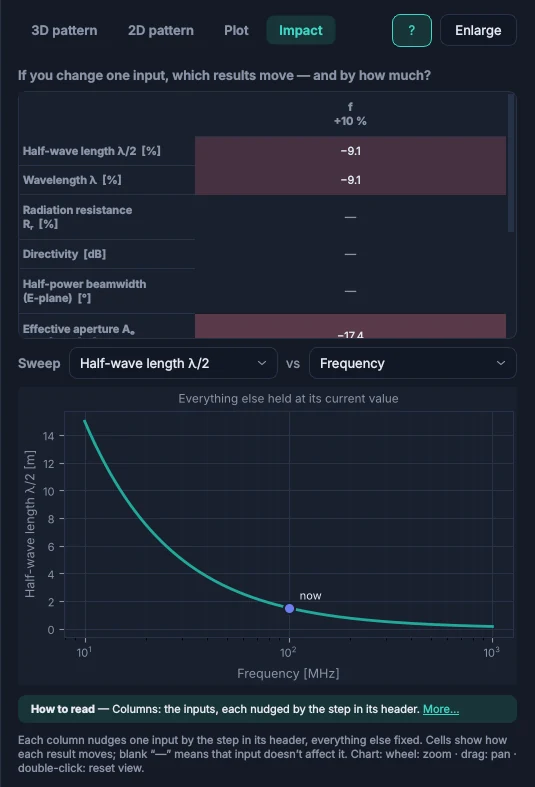
The Impact view shows how far each result moves when one input changes by 10%. A sweep plots any result against any input, with everything else held.
Type 5.8 GHz, 3e8/2.4e9 or c/915e6. Every result is saved with its inputs and exports to CSV.
Link lab Professional
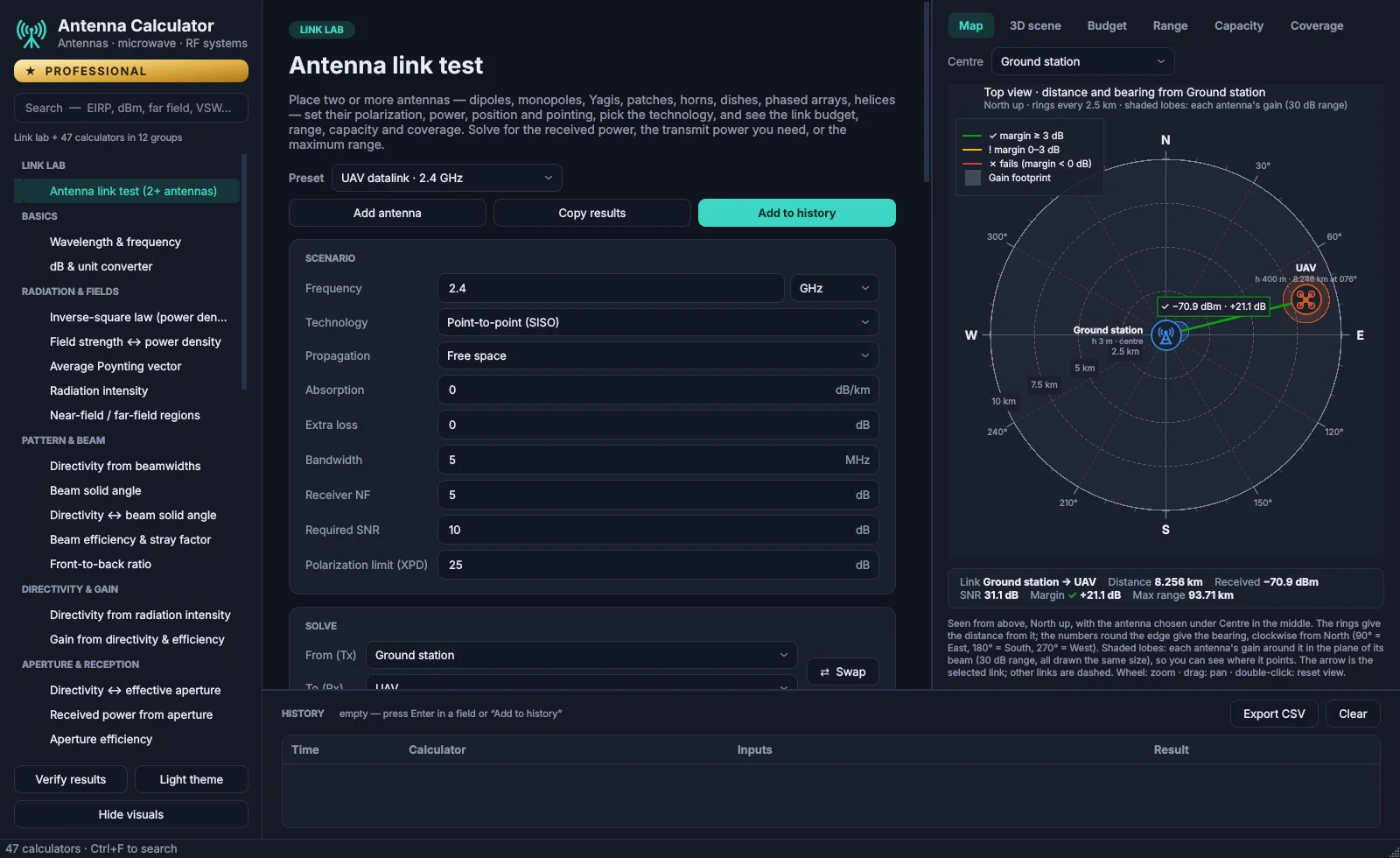
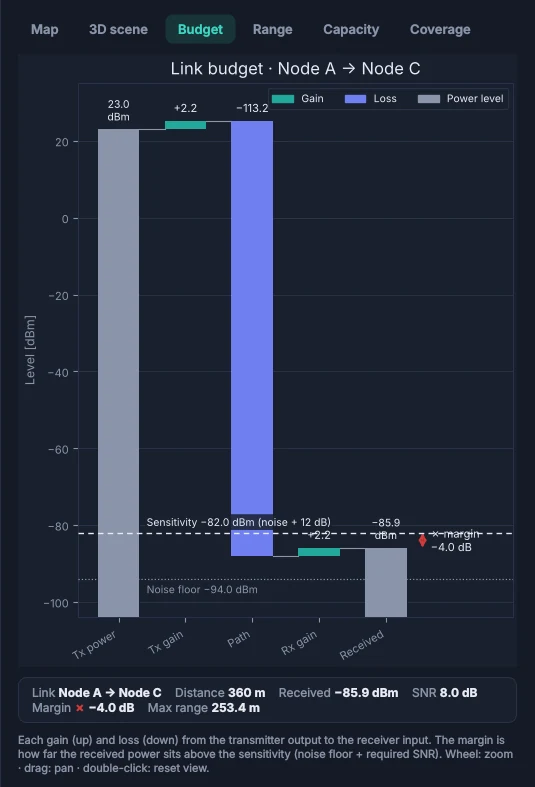
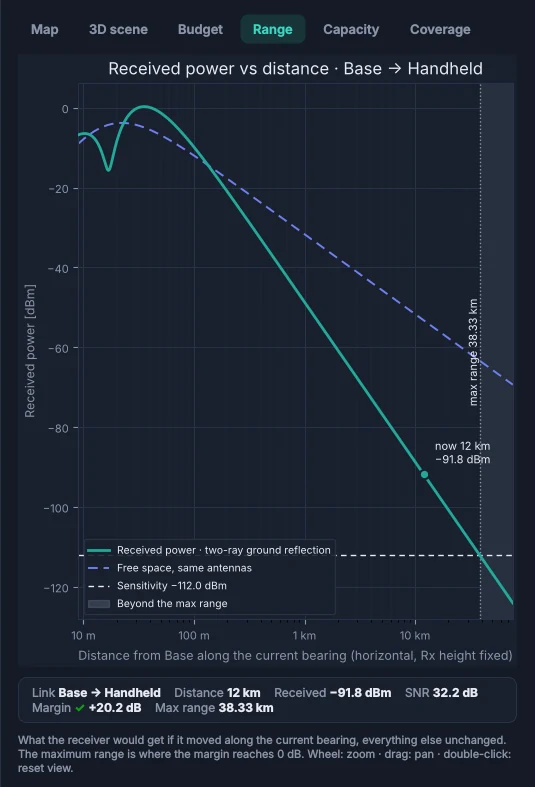
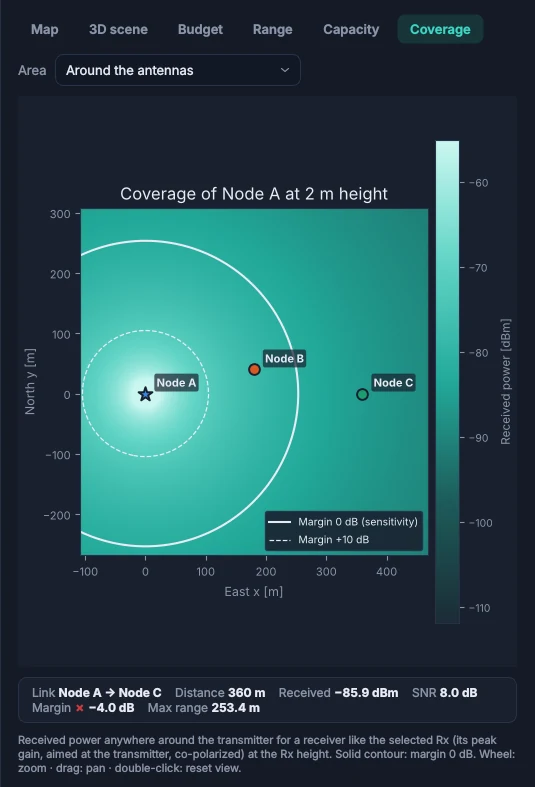
Put two or more antennas on the map and give each its type, power, height, pointing and polarization. The lab works out the budget of every link and shows whether it closes. Add the weather — clear sky, cloud, fog or rain, from the ITU-R models — and watch the link in the 3D test range.
Microwave & RF systems
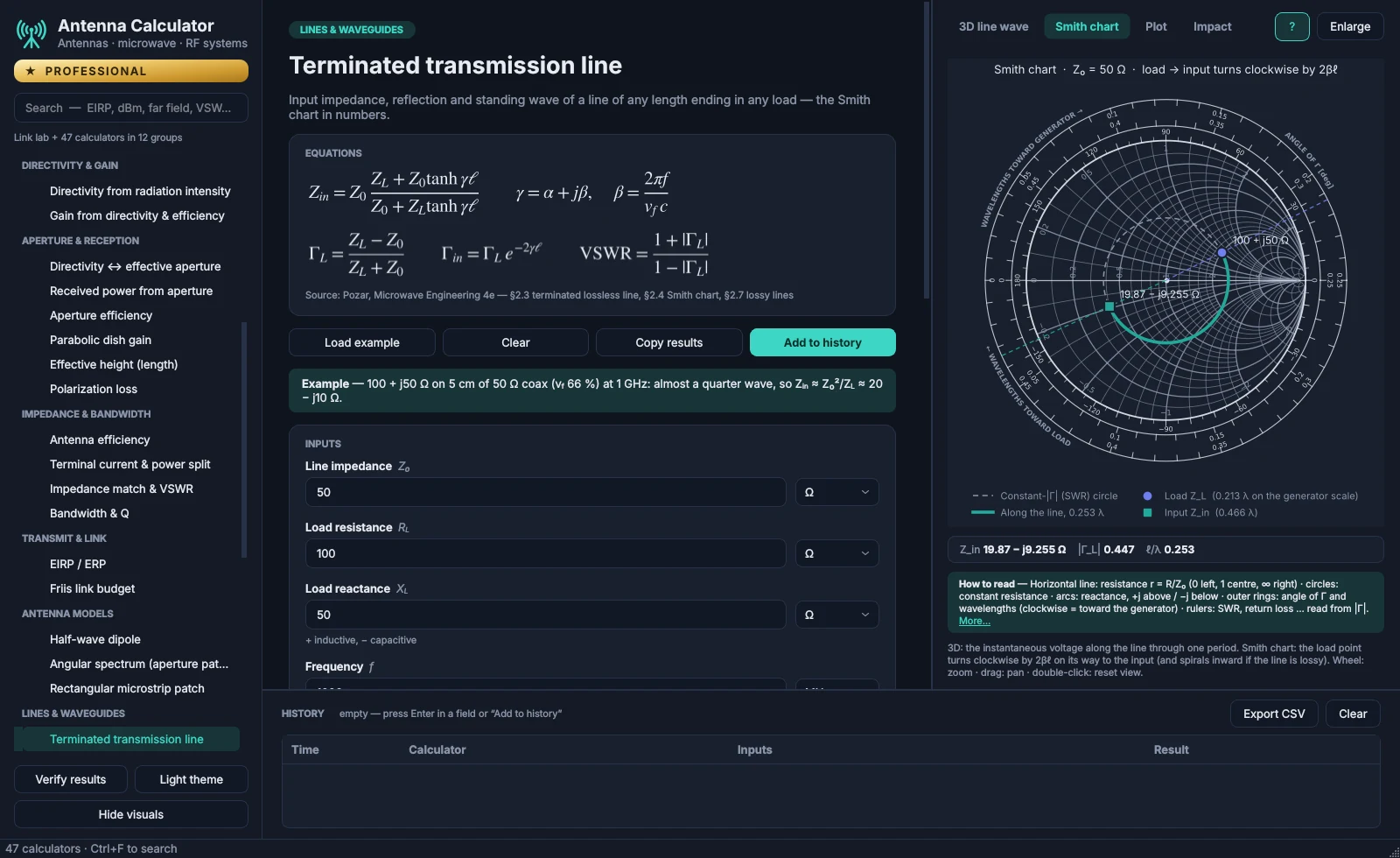
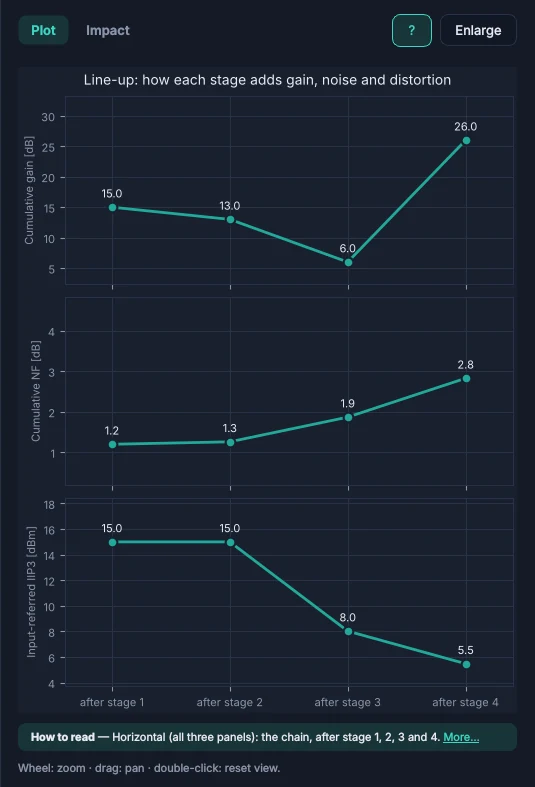
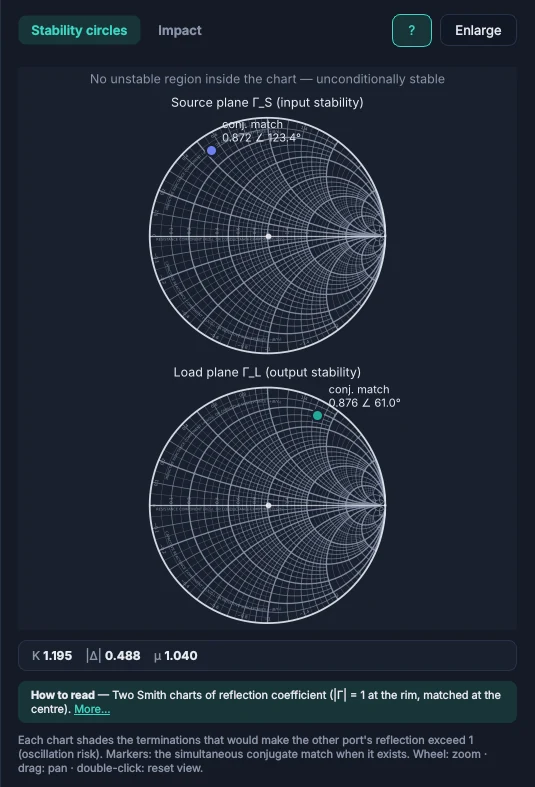
17 calculators follow D. M. Pozar's Microwave Engineering. The Smith chart, stability circles and line-up plots redraw with every input, and each calculator names the section its equations come from.
Checked results
Every calculator is tested against worked examples from the course material it is built on, from Balanis' Antenna Theory, Proakis & Salehi's Digital Communications and Pozar. Click Verify results in the app to run them on your PC. Setup runs the same checks before it replaces your installed version.
mmWave Calculator reference checks
      check                                     expected   got
PASS  Q11  Aₑ for D = 900 at 1 GHz              6.437 m²   6.4369 m²
PASS  λ/2 dipole radiation resistance           73.13 Ω    73.13 Ω
PASS  Balanis Ex 2.10 realized gain             1.6376     1.6377
PASS  Balanis Ex 14.1 patch length L            0.906 cm   0.90534 cm
PASS  Pozar 5.4 quarter-wave 10→50 Ω: Z₁        22.36 Ω    22.361 Ω
PASS  Proakis Ex 4.10-3: P_R/N₀                 84.3 dB-Hz 84.213 dB-Hz
PASS  Proakis: 16-QAM needs ≈ 13.4 dB for 10⁻⁵   13.4 dB    13.435 dB
…
PASS  32-QAM: simulated bit errors / exact BER  1 ×        1.0175 ×
…
226/226 checks passed.
Every calculator
Search the way you think: a quantity, a unit or a term such as VSWR, dBm, far field or G/T. The app's own search works the same way.
47 / 47
Names and descriptions as they appear in the app.
Install & update
After checkout, an email links you to the download page with the Setup of your plan.
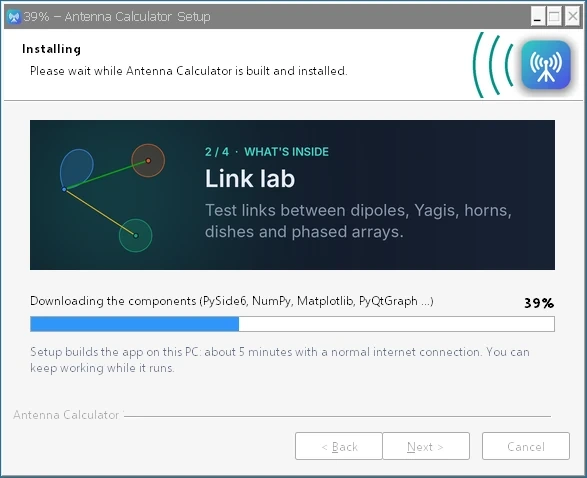
Accept the license, choose the folder and shortcuts, and watch the progress. Setup builds the app on your PC in about 5 minutes and needs no administrator rights.
When the app opens, sign up with the email address you subscribed with. A 6-digit code by email confirms it, and the app unlocks your plan.
Pricing
Every plan includes 2D and 3D radiation patterns, the impact view and the Windows Setup. Pay monthly or yearly.
| Calculators | Student | Standard | Professional |
|---|---|---|---|
| Calculators | |||
| Basics | Included | Included | Included |
| Radiation & fields | Included | Included | Included |
| Pattern & beam | 4 of 5 | Included | Included |
| Directivity & gain | Included | Included | Included |
| Aperture & reception | Included | Included | Included |
| Impedance & bandwidth | 3 of 4 | Included | Included |
| Transmit & link | Included | Included | Included |
| Antenna models | 1 of 3 | Included | Included |
| Lines & waveguides | Included | Included | Included |
| Impedance matching | Not included | Included | Included |
| Noise, gain & linearity | Not included | Included | Included |
| Receivers & systems | Not included | Not included | Included |
| Calculators in total | 30 | 41 | 47 |
| Views and tools | |||
| Complete Smith charts and stability circles | Results only | Included | Included |
| 2D and 3D patterns, impact view, sweep, history and CSV export | Included | Included | Included |
| Unit converters (°C/°F, SI ↔ imperial) | Included | Included | Included |
| Materials and periodic table | Included | Included | Included |
| Frequency bands (ITU, IEEE, NATO, waveguides) | Included | Included | Included |
| RF system builder | Not included | Not included | Included |
| Antenna currents and fields (J-surf) | Not included | Not included | Included |
| Link lab | Not included | Not included | Included |
| Two-tone IMD test bench | Not included | Not included | Included |
| Modulation test bench (ACLR, EVM; NR, LTE, SC-FDMA, CDMA) | Not included | Not included | Included |
| Digital modulation and access lab (37 modulations; CDMA, OFDMA, SC-FDMA, NOMA) | Not included | Not included | Included |
| What's next | |||
| New modules, starting with phased-array design | Not included | Not included | First access |
| Lab-instrument test automation | Not included | Not included | Planned |
Choose a plan and pay on the secure Lemon Squeezy checkout. Students first confirm their university email with a code.
Your confirmation and receipt arrive straight away.
When the payment has cleared, a second email links you to the download page of this site. Install the app and create your account with the same email address.
Every plan can be cancelled whenever you like, from the link in your receipt.
Prices in Swiss francs (CHF). At checkout, Lemon Squeezy charges the equivalent in US dollars, and your bank may convert it into your currency. Payments, receipts and cancellations are handled by Lemon Squeezy.
Yes: 14 days, no card needed. Download the app, create an account and confirm your email; the Student plan's 30 calculators open straight away. The Standard and Professional calculators stay visible with a lock. The app shows how many days are left, and when the trial ends the calculators lock until you choose a plan. There is one free trial per person and per computer.
You get a confirmation with your receipt by email straight away. When the payment has cleared, a second email links you to the download page, where you download the Setup of your plan. When the app opens, create your account with the email address you subscribed with.
Yes. Every plan, monthly or yearly, can be cancelled at any time from the link in your receipt email; the next payment is then not taken. Because you can try the app free for 14 days first, payments are not refunded, with three exceptions: a double or mistaken charge; a yearly renewal you forgot to cancel, if you write within 14 days of it; and an app that won't run on your PC when we can't fix it within 14 days of your payment. For these, write to support@mmwaveapp.com; the plan ends when the refund is made.
Students at the universities and colleges in our list of more than 24,000 institutions worldwide, using their university email address. We email a 6-digit code to that address to confirm it is yours. Once a year you confirm it again with a new code; the app and an email remind you 30 days before. If your university is not in the list, student pricing is unfortunately not available.
Lemon Squeezy runs the checkout. It takes the payment, sends your receipt and gives you the link to cancel or update your card at any time.
Everything in Standard, plus the five receiver and system calculators (receiver sensitivity, G/T, link budget with SNR margin and rain fade by ITU-R P.838 / P.530, radar range and C/N₀), the RF system builder (any RF chain from symbols, with virtual instruments, the antenna’s beam and coverage, and temperature drift in °C or °F, for the whole system or for temperature zones you draw over any section), antenna currents and fields (J-surf: how the current flows on wire antennas, patches, horns, dishes and phased arrays, and their E and H fields), the link lab, the two-tone IMD test bench (IP3 and IM2 … IM11, simulated or from your own spectrum-analyser readings) and the modulation test bench (ACLR, EVM, CCDF and AM-AM/AM-PM with 5G NR, LTE, QAM or your own I/Q file). Professional subscribers also get new modules first, starting with phased-array design, and lab-instrument test automation is planned. New in 2.2: the digital modulation and access lab — 37 modulations from OOK and BPSK to 4096-QAM, APSK, FSK, MSK and GMSK, with exact bit error rates checked by simulation, plus CDMA, frequency hopping, OFDMA, SC-FDMA and NOMA.
Windows 10 and Windows 11, 64-bit. The 3D views use the graphics card through OpenGL; on a PC without it, the app says so in its status bar and draws the 3D views in software. An account can be signed in on two computers at a time, for example a work PC and a laptop; you can sign one out from the app.
No. Setup looks for Python 3.10 to 3.14 and, if there is none, installs Python 3.12 for your user account with Windows Package Manager. The components the app needs go into a private folder, so your own Python setup is not touched.
Setup builds the app on your PC from its source code, so the first installation downloads about 150 MB of components (Professional about 230 MB, with the 3D engine of the surface-current view). After that the app needs the internet only to sign in and check your plan, and works offline for up to 14 days at a time.
Run the new Setup file. It finds the installed copy and updates it in place, so there is no need to uninstall first. If the app is open, Setup asks before closing it. If you kept the build tools, an update takes about 2 minutes.
SmartScreen shows this for programs it has not seen often yet. Choose More info, then Run anyway.
The antenna calculators follow S. Joardar's Basics of Antennas course material and C. A. Balanis, Antenna Theory, 4th edition; the microwave and RF-system calculators follow D. M. Pozar, Microwave Engineering, 4th edition, and the digital-link calculators J. G. Proakis and M. Salehi, Digital Communications, 5th edition. Each calculator shows its equations and names its source, and 161 reference checks compare the results with worked examples.
Settings › Apps › Installed apps › mmWave Calculator › Uninstall. The uninstall wizard can also remove the build tools Setup keeps for faster updates.
The student plan covers 30 calculators. For more, subscribe to Standard or Professional at the regular price and cancel the student plan from the link in its receipt.
Use the feedback form at the bottom of this page, or Send feedback in the app's account menu. Write as much as you like; only the developer reads it.
The app's interface is in English, and so are the student verification page and the emails. This website is available in English, German (for Germany, Austria and Switzerland), French, Spanish, Dutch, Italian, Polish and Greek.
Write to support@mmwaveapp.com with the email address of your account and what happened; a screenshot helps. In the app, the account menu has Contact support. Ideas and opinions are welcome in the feedback form below.
Partner with us
mmWave Calculator is made by an RF engineer and grows with the people who use it. If you’d like to work with us, support the project or invest in it, write to us.
Universities, labs and authors: course material, measurement data to validate against, new calculators and joint features.
Sponsor a module, a student programme or licences for a university course, with your name on it.
Resellers, distributors and makers of RF parts and test equipment who want to reach engineers.
We’re open to talking with investors who want to help the project grow faster.
Feedback
Ideas, problems, a calculator you're missing, what you use it for — write as much as you like. Only the developer reads it.