Every antenna. Every link. One window.

See the beam. Before you build it.

47 antenna, microwave and RF calculators in one Windows app. Type a value and watch the pattern, the Smith chart and the link budget redraw.

Free for 14 days, no card needed. Then from CHF 35.99 a month, CHF 19.99 for students.

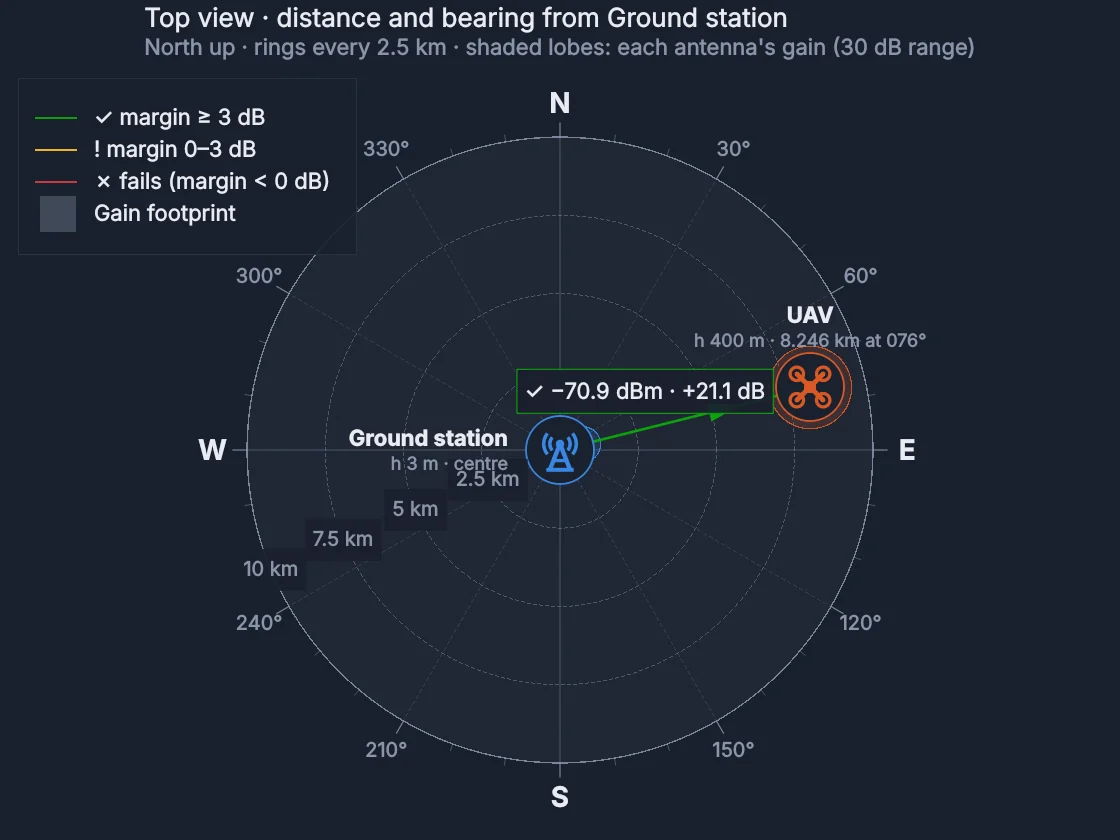
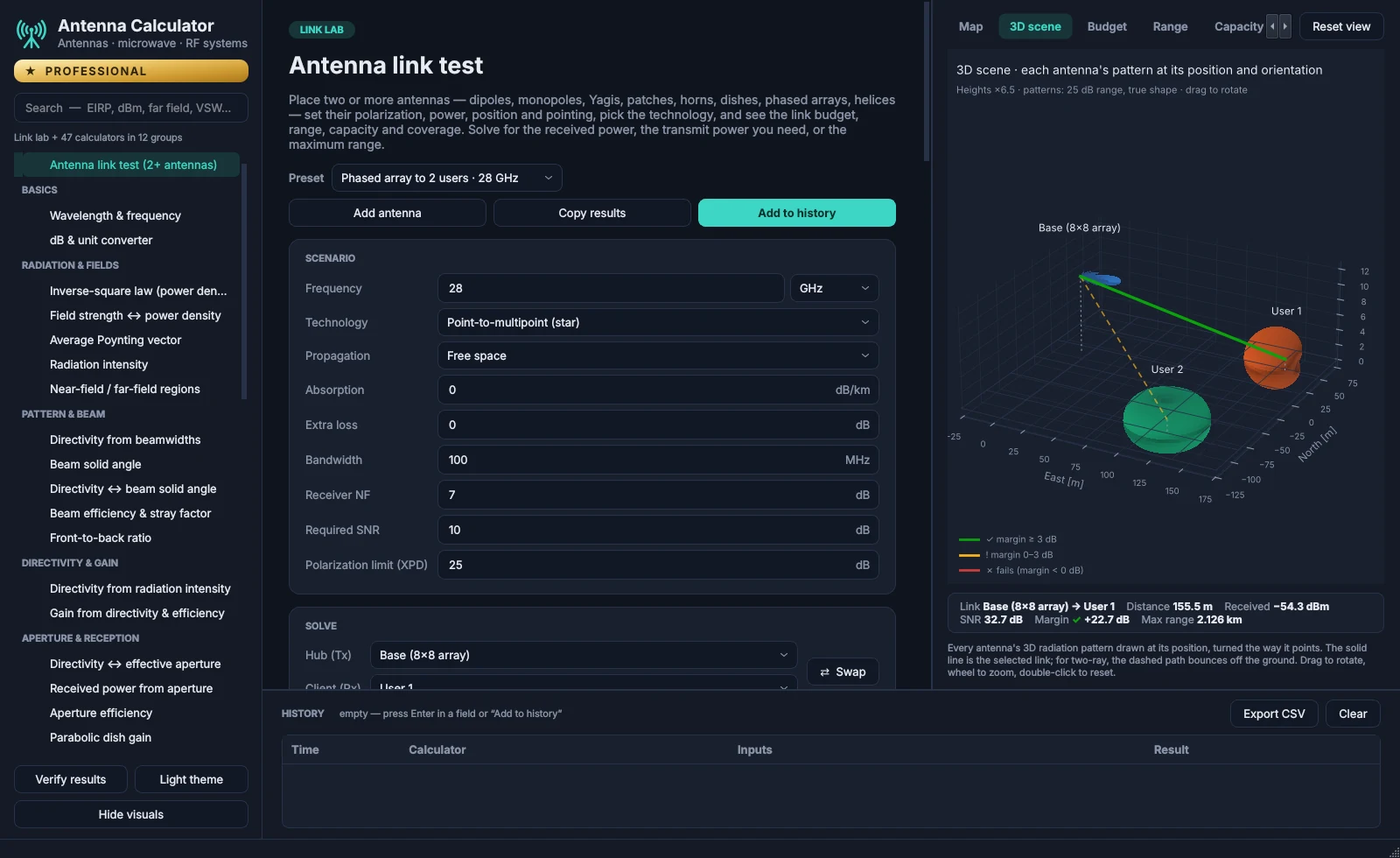
The app's link lab: a phased-array base station at 28 GHz serving two users, with each antenna's 3D radiation pattern drawn at its position.

From HF to millimetre wave: type any frequency, in any unit.Band letters: IEEE Std 521

Equations from

Balanis · Antenna Theory

Pozar · Microwave Engineering

Proakis & Salehi · Digital Communications

ITU-R · Recommendations

Pick your path

What are you working on?

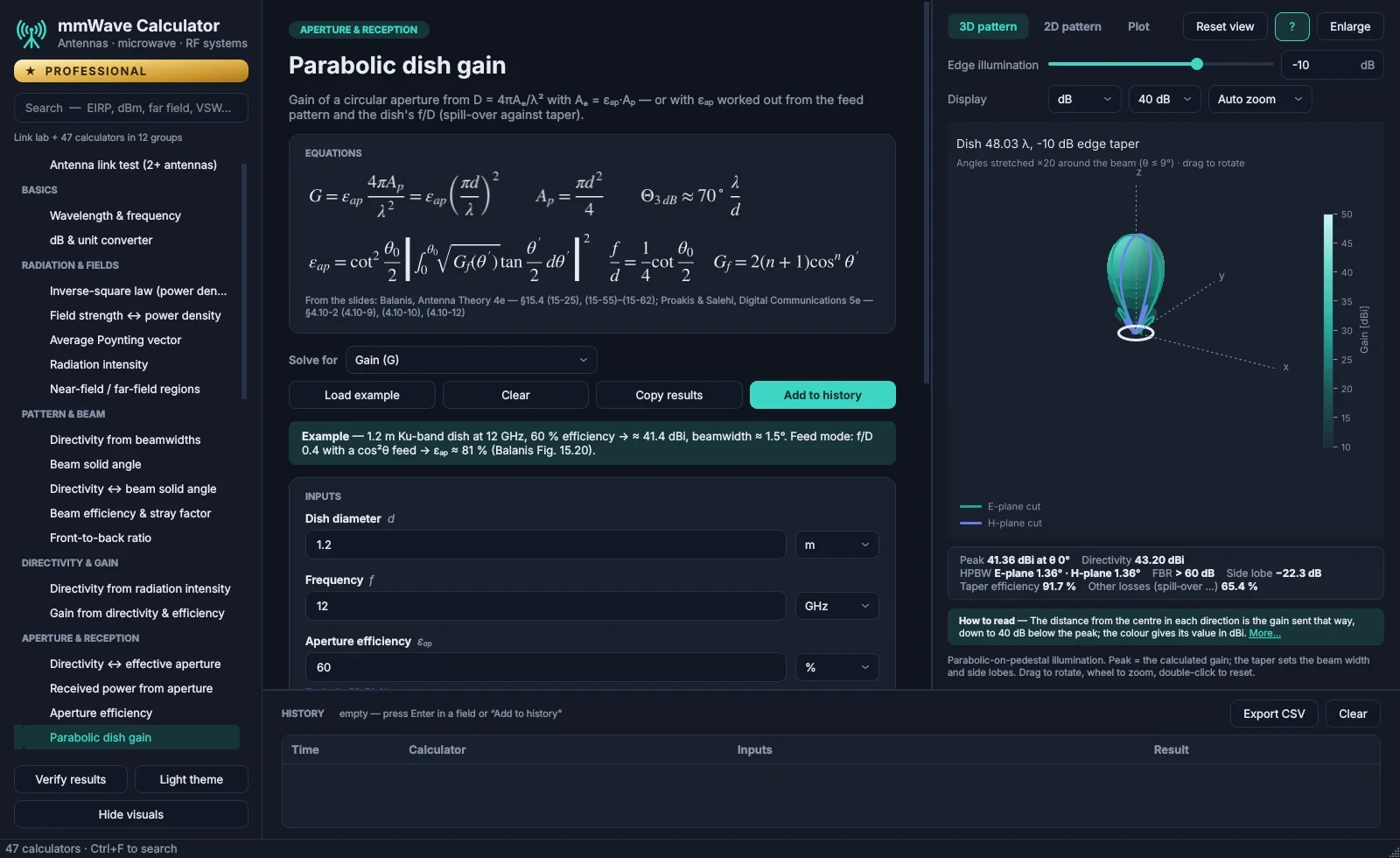
The parabolic dish gain calculator: its equations, inputs and results beside a 3D radiation pattern.
Every plan · the patch from Standard

See the antenna behind every number.

Dipoles, patches, dishes and apertures, each with its pattern in 2D and in 3D, redrawn as you type.

  • Beamwidth, side lobes and front-to-back marked on the 2D cuts
  • Directivity, gain, aperture and efficiency from the textbook equations
  • Change one input by 10% and see which results follow
Try it right here

Try it here

Don’t just read about it. Try it.

Two small calculators, worked out live in your browser. The app has 47 of them, each with its equations, its plots and its source.

0°+30°+60°−30°−60° 0 dB−10−20−30

Drag across the plot to steer the beam.

Beamwidth (−3 dB)
–
Directivity
–
Strongest side lobe
–
Beam points to
+20°

Uniform linear array, half-wavelength spacing, cos θ elements.

Every calculator

47 calculators. One search box.

Search the way you think: a quantity, a unit or a term such as VSWR, dBm, far field or G/T. The app's own search works the same way.

All 47 with descriptions

Names and descriptions as they appear in the app.

Pricing

Free for 14 days. Then pick a plan.

No card for the trial, and nothing is charged when it ends. Then pay monthly or yearly, and cancel any time.

Free trial

14 days free. No card needed.

Download the app and create an account: the Student plan's 30 calculators open at once, free for 14 days. The Standard and Professional calculators are there too, with a lock, so you can see what each plan adds.

One free trial per person and per computer. When it ends, the calculators lock until you choose a plan. Nothing is charged automatically.

Free trial download opens soon
Student price

Student

For students at listed universities and colleges

CHF 19.99/ month

or CHF 199 a year, save 17%

  • 30 calculators for antennas, transmission lines and waveguides
  • 2D and 3D patterns, impact view and sweep
  • Confirmed with a code sent to your university email
  • Cancel any time
Check eligibility
Everyday RF design

Standard

For engineers who design lines, matching and RF chains

CHF 35.99/ month

or CHF 379.99 a year, save 12%

  • 41 calculators, adding matching networks, patch antennas, noise, IP3 and amplifier stability
  • Complete Smith charts and stability circles
  • 2D and 3D patterns, impact view and sweep
  • Cancel any time
Checkout opens soon
First to get new modules

Professional

Everything, including the link lab and what comes next

CHF 55.99/ month

or CHF 599 a year, save 11%

  • All 47 calculators, adding receivers, G/T, radar, C/N₀ and modulation bit error rates
  • The RF system builder, J-surf antenna currents and fields, the modulation and access lab, the link lab with a 3D test range and ITU-R weather and test benches for IMD and modulation
  • First access to new modules, starting with phased-array design
  • Lab-instrument test automation is planned
  • Cancel any time
Checkout opens soon

Try it free for 14 days before you pay. Payments aren't refunded, except for billing mistakes, a forgotten yearly renewal, or an app that won't run on your PC (see the FAQ).

Compare the plans side by side

Student pricingCheck your eligibility.

Student pricing is for students at the universities and colleges in our list of more than 24,000 institutions worldwide, with engineering and technology schools well covered. Choose yours and enter your university email address.

To confirm the address is yours, we email it a 6-digit code. The checkout then opens for that address only, and your receipt and download link go to it.

If your university is not in the list, student pricing is unfortunately not available. University lists: university-domains-list, JetBrains swot.

Choose your university, then enter your email address there.

Email me a code (CHF 19.99 a month)

Students

Check your homework against the book.

Choose your university, confirm your university email with a code, and you’re in for CHF 19.99 a month.

Check eligibility →

For organizations

One licence for your whole team.

Professional for the people you name, for a year or the months of a project, paid by invoice.

Request a quote →

Prices in Swiss francs (CHF). At checkout, Lemon Squeezy charges the equivalent in US dollars, and your bank may convert it into your currency. Payments, receipts and cancellations are handled by Lemon Squeezy.

Questions? Answers.

Is there a free trial?

Yes: 14 days, no card needed. Download the app, create an account and confirm your email; the Student plan's 30 calculators open straight away. The Standard and Professional calculators stay visible with a lock. The app shows how many days are left, and when the trial ends the calculators lock until you choose a plan. There is one free trial per person and per computer.

Can I cancel?

Yes. Every plan, monthly or yearly, can be cancelled at any time from the link in your receipt email; the next payment is then not taken. Because you can try the app free for 14 days first, payments are not refunded, with three exceptions: a double or mistaken charge; a yearly renewal you forgot to cancel, if you write within 14 days of it; and an app that won't run on your PC when we can't fix it within 14 days of your payment. For these, write to support@mmwaveapp.com; the plan ends when the refund is made.

Who can get the student price?

Students at the universities and colleges in our list of more than 24,000 institutions worldwide, using their university email address. We email a 6-digit code to that address to confirm it is yours. Once a year you confirm it again with a new code; the app and an email remind you 30 days before. If your university is not in the list, student pricing is unfortunately not available.

What does Professional add?

Everything in Standard, plus the five receiver and system calculators (receiver sensitivity, G/T, link budget with SNR margin and rain fade by ITU-R P.838 / P.530, radar range and C/N₀), the RF system builder (any RF chain from symbols, with virtual instruments, the antenna’s beam and coverage, and temperature drift in °C or °F, for the whole system or for temperature zones you draw over any section), antenna currents and fields (J-surf: how the current flows on wire antennas, patches, horns, dishes and phased arrays, and their E and H fields), the link lab, the two-tone IMD test bench (IP3 and IM2 … IM11, simulated or from your own spectrum-analyser readings) and the modulation test bench (ACLR, EVM, CCDF and AM-AM/AM-PM with 5G NR, LTE, QAM or your own I/Q file). Professional subscribers also get new modules first, starting with phased-array design, and lab-instrument test automation is planned. New in 2.2: the digital modulation and access lab — 37 modulations from OOK and BPSK to 4096-QAM, APSK, FSK, MSK and GMSK, with exact bit error rates checked by simulation, plus CDMA, frequency hopping, OFDMA, SC-FDMA and NOMA.

Which computers does it run on?

Windows 10 and Windows 11, 64-bit. The 3D views use the graphics card through OpenGL; on a PC without it, the app says so in its status bar and draws the 3D views in software. An account can be signed in on two computers at a time, for example a work PC and a laptop; you can sign one out from the app.

Where do the formulas come from?

The antenna calculators follow S. Joardar's Basics of Antennas course material and C. A. Balanis, Antenna Theory, 4th edition; the microwave and RF-system calculators follow D. M. Pozar, Microwave Engineering, 4th edition, and the digital-link calculators J. G. Proakis and M. Salehi, Digital Communications, 5th edition. Each calculator shows its equations and names its source, and 161 reference checks compare the results with worked examples.

More questions and answers

Close twenty tabs. Open one app.

From a quick dB sum to a link that has to survive the rain.

Windows 10 and 11 · no card needed